In 2026, You do not need to spend several thousand baht to get a good gaming mouse anymore.
For this guide, we compared current Thai pricing, manufacturer specifications, sensor hardware, weight, connectivity, software support, warranty information, and overall value for money.
Best Overall: ASUS TUF Gaming M3 Gen II
Best Wireless Value: AJAZZ AJ159 NL
Best Safe Buy: Logitech G102 LIGHTSYNC
| Mouse | Approx. Price | Weight | Connection | Best For |
|---|---|---|---|---|
| ASUS TUF Gaming M3 Gen II | ~฿690 | 59g | Wired | Best Overall / FPS |
| AJAZZ AJ159 NL | ~฿790 | ~61g | NearLink / Bluetooth / USB-C | Wireless Value |
| Logitech G102 LIGHTSYNC | ฿590 | 85g | Wired | Safe First Buy |
| Corsair Katar Pro | ~฿540 | 69g | Wired | Claw / Fingertip |
| Nubwo X210 Vortex | ฿649 | — | 2.4GHz / Bluetooth / USB-C | Most Features |
| Logitech G304 LIGHTSPEED | ฿990 | 99g | 2.4GHz LIGHTSPEED | Proven Wireless |
| Razer DeathAdder Essential | ฿590 | 96g | Wired | Palm Grip / Large Hands |
Price note: Thai prices were checked on 22 August 2026 where current listings were available. Promotions, stock and marketplace prices can change quickly.
1. ASUS TUF Gaming M3 Gen II — Best Overall
Approximate price: ฿690
The ASUS TUF Gaming M3 Gen II is our strongest all-round recommendation under ฿1,000. Its standout feature is its 59g weight, which is unusually light for a major-brand mouse at this price. ASUS specifies a PAW3318 optical sensor, up to 8,000 DPI, a 1,000Hz report rate, six programmable buttons, switches rated for 60 million clicks, and IP56 dust and water resistance.
- Pros: 59g, 1,000Hz, strong durability, IP56, established brand
- Cons: wired only, right-handed shape
- Best for: FPS players and anyone chasing strong performance-per-baht
Value Gaming Score: 9.3/10
Before monetizing: replace these search links with your own affiliate deep links.
2. AJAZZ AJ159 NL — Best Wireless Value

Approximate price: ฿790 when available
The AJAZZ AJ159 NL is one of the reasons budget wireless mice are so interesting in 2026. The 800mAh NL variant listed in Thailand uses a PAW3311 sensor, NearLink wireless, Bluetooth 5.4, USB-C wired connectivity, up to 1,000Hz reporting, and weighs around 61g.
- Pros: lightweight, wireless, Bluetooth, USB-C, rechargeable, 1,000Hz
- Cons: multiple variants can be confusing; software/support is less mature than Logitech
- Best for: buyers who want lightweight wireless without spending ฿1,000+
Value Gaming Score: 9.2/10
Before monetizing: replace these search links with your own affiliate deep links.
3. Logitech G102 LIGHTSYNC — Best Safe Buy

Current Thai price: ฿590
The Logitech G102 is older than many mice on this list, but at ฿590 it remains one of the easiest recommendations for a first gaming mouse. The Thai listing specifies 200–8,000 DPI, six programmable buttons, 1,000Hz USB reporting, an 85g body, and Logitech G HUB support.
- Pros: affordable, 1,000Hz, G HUB, easy to find
- Cons: 85g, wired, older design
- Best for: beginners who want a reliable, uncomplicated choice
Value Gaming Score: 8.9/10
Before monetizing: replace these search links with your own affiliate deep links.
4. Corsair Katar Pro — Best for Claw / Fingertip Grip

Current Thai price: about ฿540
The Corsair Katar Pro is easy to overlook, but its current price makes it very competitive. It uses a PAW3327 optical sensor, reaches 12,400 DPI, weighs 69g, supports up to 1,000Hz reporting, has six programmable buttons, and works with Corsair iCUE.
- Pros: 69g, PAW3327, 1,000Hz, iCUE, excellent price
- Cons: wired; compact shape is not ideal for large-hand palm grip
- Best for: claw/fingertip users wanting a lightweight mouse for very little money
Value Gaming Score: 8.9/10
Before monetizing: replace these search links with your own affiliate deep links.
5. Nubwo X210 Vortex — Most Features for the Money
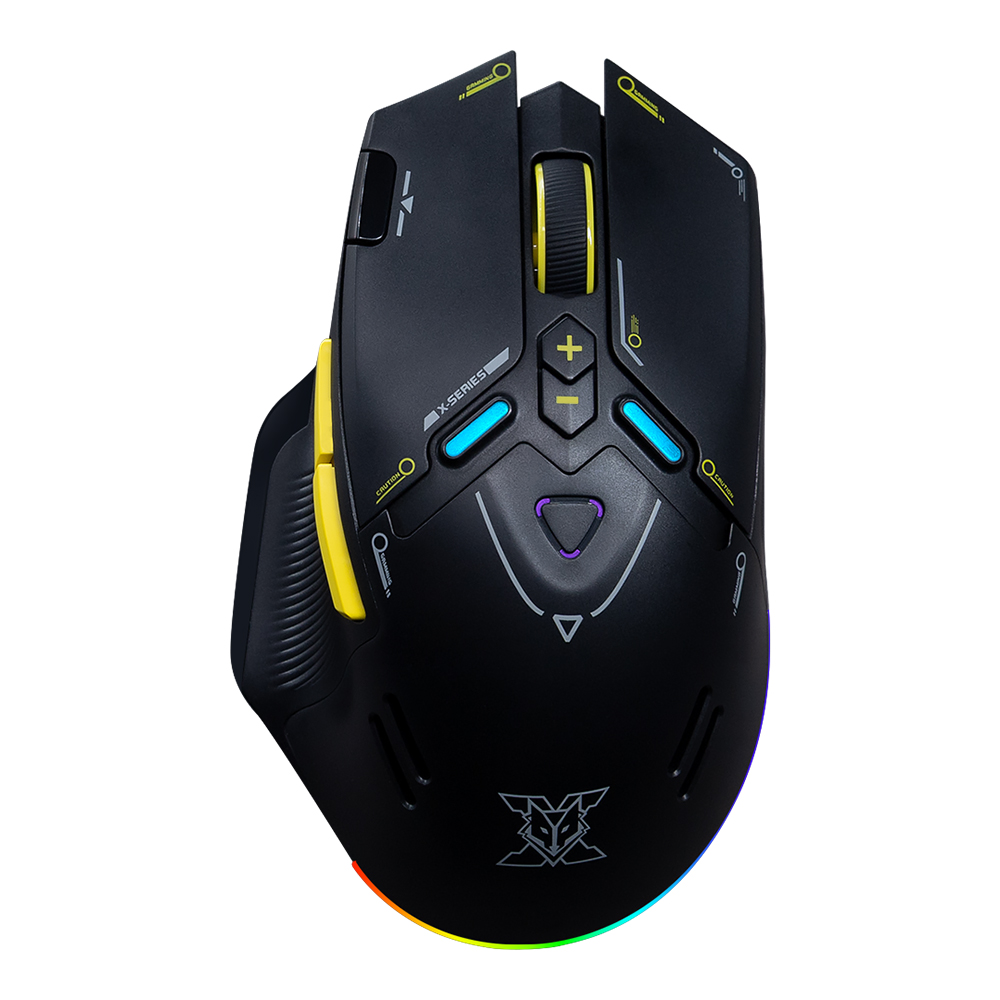
Current Thai price: ฿649
The Nubwo X210 Vortex packs an unusual amount of hardware into its price. JIB lists a PAW3311 sensor, up to 12,000 DPI, 1,000Hz polling, 2.4GHz wireless, Bluetooth 5.2, USB-C wired mode, nine programmable buttons, a 500mAh battery, and up to 70 hours of use.
- Pros: tri-mode connectivity, nine buttons, rechargeable, 1,000Hz, low price
- Cons: smaller software ecosystem and less long-term reliability data
- Best for: buyers who want maximum features per baht
Value Gaming Score: 8.8/10
Before monetizing: replace these search links with your own affiliate deep links.
6. Logitech G304 LIGHTSPEED — Best Proven Wireless

Current Thai price: ฿990
The Logitech G304 is not the lightest wireless mouse anymore, but its strengths are proven technology and excellent battery life. The Thai listing specifies the HERO sensor, 200–12,000 DPI, 1,000Hz / 1ms wireless reporting, over 400 IPS tracking, six buttons, 99g weight, and up to 250 hours from one AA battery.
- Pros: proven LIGHTSPEED wireless, HERO sensor, long battery life, G HUB
- Cons: 99g, AA battery, no Bluetooth, nearly the full ฿1,000 budget
- Best for: buyers who prioritize reliability over minimum weight
Value Gaming Score: 8.7/10
Before monetizing: replace these search links with your own affiliate deep links.
7. Razer DeathAdder Essential — Best for Palm Grip

Current Thai price: ฿590
The Razer DeathAdder Essential earns its place because of its shape rather than modern spec-sheet dominance. Razer and Thai retailer specifications list a 6,400 DPI optical sensor, 220 IPS, 30G acceleration, five programmable buttons, a right-handed ergonomic shell, and a 96g weight.
- Pros: comfortable ergonomic shape, inexpensive, established brand
- Cons: 96g, wired, older sensor/switch generation
- Best for: larger hands and palm-grip users
Value Gaming Score: 8.5/10
Before monetizing: replace these search links with your own affiliate deep links.
Which One Should You Buy?
Best overall: ASUS TUF Gaming M3 Gen II. If you find it around ฿690 or lower, the 59g weight and 1,000Hz polling rate make it extremely hard to beat.
Best wireless value: AJAZZ AJ159 NL. It gives you modern wireless connectivity and low weight without using the entire ฿1,000 budget.
Safest first purchase: Logitech G102 LIGHTSYNC.
Large hands / palm grip: Razer DeathAdder Essential.
Claw or fingertip grip: Corsair Katar Pro.
Maximum features: Nubwo X210 Vortex.
What Actually Matters in a Budget Gaming Mouse?
Shape matters more than a giant DPI number
A 26,000 DPI mouse is not automatically better than an 8,000 DPI mouse. Most players use much lower sensitivity. A comfortable shape that matches your hand and grip style matters far more.
Weight changes how a mouse feels in fast games
For FPS gaming, lower weight can make large swipes and quick corrections easier. That is why the 59g ASUS and roughly 61g AJAZZ stand out.
1,000Hz is already enough for most budget buyers
A 1,000Hz polling rate reports movement up to 1,000 times per second. Higher polling rates exist, but they are not the first thing we would pay extra for below ฿1,000.
Wireless is no longer automatically worse
Modern 2.4GHz gaming wireless can provide very low latency. At this budget, battery life, weight, software quality and model reliability matter more.
FAQ
Is a ฿500–฿1,000 gaming mouse good enough for competitive games?
Yes. A good budget mouse with a stable sensor, comfortable shape and 1,000Hz polling can be perfectly usable for Valorant, CS2, Apex Legends, League of Legends, Dota 2 and similar games.
Should I choose wired or wireless?
Choose wired if you want the simplest setup and the lowest price. Choose wireless if desk freedom matters and you are comfortable managing a battery or charging cycle.
Which mouse is best for FPS?
From this list, the ASUS TUF Gaming M3 Gen II is our first pick because of its 59g weight, 1,000Hz polling and low price.
Which is the best wireless mouse under ฿1,000?
The AJAZZ AJ159 NL offers the strongest modern feature set for the money. The Logitech G304 is heavier but has a longer reliability track record.
Final Verdict
The budget gaming mouse market is much better than it used to be. Under ฿1,000, you can now choose between extremely light wired models, rechargeable wireless mice, established-brand safe picks and feature-heavy multi-mode options.
For pure value, start with the ASUS TUF Gaming M3 Gen II. If wireless is a priority, look at the AJAZZ AJ159 NL. If you want an inexpensive mouse from a familiar ecosystem, the Logitech G102 remains a very sensible choice.
Research note: Specifications were checked against manufacturer information and Thai retailer listings. Prices and availability were checked on 22 August 2026
